Notepad++ - new User Defined Language (UDL2)


UDL (User Defined Language) is one of most important features in Notepad++.

In v6.2, much better UDL system (UDL2) is provided by Ivan Radic (aka Loreia). Not only many restrictions/limitations in UDL are removed, but also a lot of new features/enhancements are added in UDL2. In fact, you can almost define any language with it.

The key features of UDL2 are:
1. More keyword groups were added (more syntax highlighting can be defined):
  • 3 folding groups
  • 8 keyword groups
  • 2 comment groups
  • 1 number definitons
  • 2 operators groups
  • 8 delimiter sets
2. Multipart keywords are supported (for example: "else if" can be defined as a single keyword)
3. Whitespace is no longer mandatory as keyword separator: Operators, Delimiters and Folding keywords can be recognized with or without whitespace separators.
4. Numbers recognition support is greatly improved (prefix, suffix, range and extra symbols supported).
5. Operators and delimiters can be longer than one character.
6. The same characters can be used as comments AND operators.
7. Comments and delimiters support nesting (even within each other).
8. Improvments to Comments include:
  • Comment folding
  • Comment continuation
  • Comment only start at the beginning of line
9. In the case of several comment pairs defined, comment open symbols match only with comment close symbols of the same order. (for example: /* C comment */, /+ D comment +/, but not /* mixed comment +/)

Source: notepad-plus-plus.org
read more about UDL2...

OTRS default search ticket number

You can enable default search by ticket number in SysConfig with option

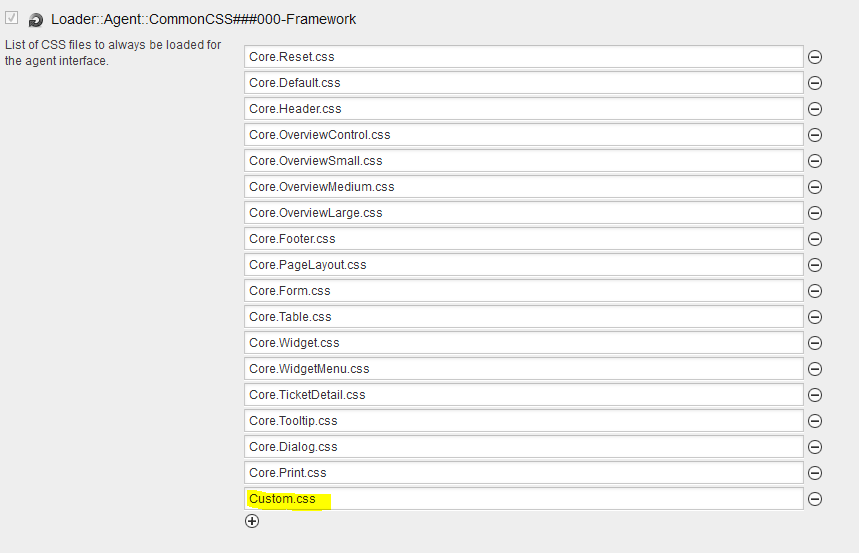
OTRS add custom CSS style


Wrong way to add it directly to HTMLHead.dtl file.

Correct way to create new Custom.css file, save it into /var/httpd/htdocs/skins/Agent/default/css/ directory
and add Custom.css item to Loader::Agent::CommonCSS###000-Framework via SysConfig editor.


 Enjoy!

OTRS enable login autocomplete in Firefox


if your username and password weren't filled out with firefox password manager you should remove readonly attribute in Login.dtl file.

Wrong:
<div class="Field"> 

<input type="text" id="User" name="User"  class="W50pc" autocomplete="off"  

readonly="readonly" />
</div>


Correct:
<div class="Field"> 

<input type="text" id="User" name="User"  class="W50pc" />
</div>


HOWTO change resolution in linux installer

when I installed fedora core it had wrong autodefined screen resolution and screen was truncated so i can't see buttons and I would like to install in graphic mode :)

I have read manual (RTFM !) and found that I can press Tab on first screen and set resolution as

resolution=1024x768


and buttons are back


Enjoy!

Lookup MX record in C#

Thank you Peter A. Bromberg for great article "Build a C# DNS MX (Mail Exchange) Record Query Class
Original
MSDN


using System;
using System.Collections;
using System.ComponentModel;
using System.Runtime.InteropServices;

namespace DNS_MX
{
    public class DnsMx
    {
        public DnsMx()
        {
        }

        [DllImport("dnsapi", EntryPoint = "DnsQuery_W", CharSet = CharSet.Unicode, SetLastError = true, ExactSpelling =true)]
        private static extern int DnsQuery([MarshalAs(UnmanagedType.VBByRefStr)]ref string pszName, QueryTypes wType,QueryOptions options, int aipServers, ref IntPtr ppQueryResults, int pReserved);

        [DllImport("dnsapi", CharSet = CharSet.Auto, SetLastError = true)]
        private static extern void DnsRecordListFree(IntPtr pRecordList, int FreeType);

        public static string[] GetMXRecords(string domain)
        {

            IntPtr ptr1 = IntPtr.Zero;
            IntPtr ptr2 = IntPtr.Zero;
            MXRecord recMx;
            if (Environment.OSVersion.Platform != PlatformID.Win32NT)
            {
                throw new NotSupportedException();
            }
            ArrayList list1 = new ArrayList();
            try
            {

                int num1 = DnsMx.DnsQuery(ref domain, QueryTypes.DNS_TYPE_MX, QueryOptions.DNS_QUERY_BYPASS_CACHE, 0, refptr1, 0);
                if (num1 != 0)
                {
                    if (num1 == 9003)
                    {
                        list1.Add("DNS record does not exist");
                    }
                    else
                    {
                        throw new Win32Exception(num1);
                    }
                }
                for (ptr2 = ptr1; !ptr2.Equals(IntPtr.Zero); ptr2 = recMx.pNext)
                {
                    recMx = (MXRecord)Marshal.PtrToStructure(ptr2, typeof(MXRecord));
                    if (recMx.wType == 15)
                    {
                        string text1 = Marshal.PtrToStringAuto(recMx.pNameExchange);
                        list1.Add(text1);
                    }
                }
            }
            finally
            {
                DnsMx.DnsRecordListFree(ptr1, 0);
            }
            return (string[])list1.ToArray(typeof(string));
        }

        private enum QueryOptions
        {
            DNS_QUERY_ACCEPT_TRUNCATED_RESPONSE = 1,
            DNS_QUERY_BYPASS_CACHE = 8,
            DNS_QUERY_DONT_RESET_TTL_VALUES = 0x100000,
            DNS_QUERY_NO_HOSTS_FILE = 0x40,
            DNS_QUERY_NO_LOCAL_NAME = 0x20,
            DNS_QUERY_NO_NETBT = 0x80,
            DNS_QUERY_NO_RECURSION = 4,
            DNS_QUERY_NO_WIRE_QUERY = 0x10,
            DNS_QUERY_RESERVED = -16777216,
            DNS_QUERY_RETURN_MESSAGE = 0x200,
            DNS_QUERY_STANDARD = 0,
            DNS_QUERY_TREAT_AS_FQDN = 0x1000,
            DNS_QUERY_USE_TCP_ONLY = 2,
            DNS_QUERY_WIRE_ONLY = 0x100
        }

        private enum QueryTypes
        {
            DNS_TYPE_MX = 15
        }

        [StructLayout(LayoutKind.Sequential)]
        private struct MXRecord
        {
            public IntPtr pNext;
            public string pName;
            public ushort wType;
            public ushort wDataLength;
            public int flags;
            public int dwTtl;
            public int dwReserved;
            public IntPtr pNameExchange;
            public ushort wPreference;
            public ushort Pad;
        }
    }
}

what is notepad 5.1

What is notepad++ ?
Definition of notepad is


Notepad++ is a free (as in "free speech" and also as in "free beer") source code editor and Notepad replacement that supports several languages. Running in the MS Windows environment, its use is governed by GPL License.
Based on the powerful editing component Scintilla, Notepad++ is written in C++ and uses pure Win32 API and STL which ensures a higher execution speed and smaller program size. By optimizing as many routines as possible without losing user friendliness, Notepad++ is trying to reduce the world carbon dioxide emissions. When using less CPU power, the PC can throttle down and reduce power consumption, resulting in a greener environment.


Source: http://notepad-plus-plus.org/

Asterisk AST_SORCERY function

 AST_SORCERY gets a field from a sorcery object. Sorcery is always created for PJSIP aors, endpoints and identifies in asterisk. It allows y...